Before you begin
Duplicate the file and decide the final aspect ratio, such as 4:3 for a card. Check that the selected area will retain enough source pixels for the intended output.
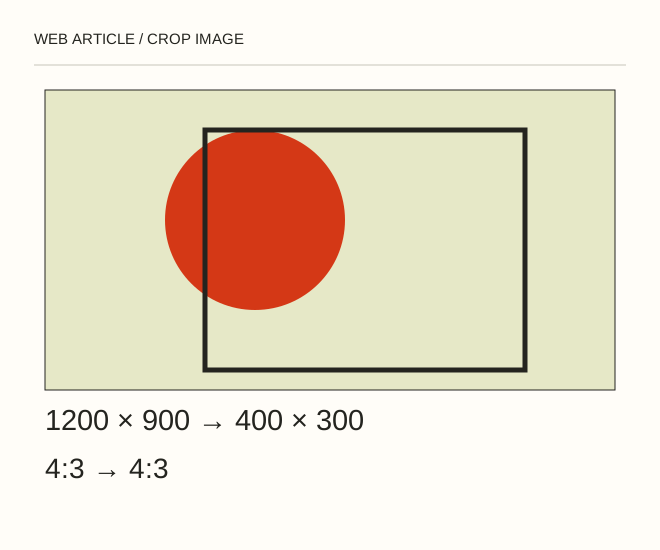
Text explanation of the diagram
Frame → Dimensions → Export. A 1200 × 900 crop has a 4:3 ratio. It fits a 400 × 300 card without distortion. A 400 × 400 cover needs a different composition or a safe square crop.
The procedure
- Choose Crop and set a ratio rather than arbitrary independent dimensions. Position the main subject inside the frame. Leave important details away from the edge because responsive containers may show a slightly different area.
- For reversible editing, disable deletion of cropped pixels where your version offers it. Keep an editable layered document and export the web result separately.
- Resize only after choosing the composition. A 600 × 450 crop cannot gain genuine 1600 × 1200 detail through ordinary enlargement.
.cover { width: 100%; aspect-ratio: 4 / 3; object-fit: cover; }A worked example
A 1200 × 900 crop has a 4:3 ratio. It fits a 400 × 300 card without distortion. A 400 × 400 cover needs a different composition or a safe square crop.
Check the result
Compare before and after; inspect faces, captions and edges. Switch between narrow and wide browser views: object-fit: cover may crop the exported frame again.
A common mistake
Canvas Size crops or expands the canvas; Image Size scales the image. Confusing these commands is a common reason parts of a picture disappear.
Sources and next steps
- Adobe — Resizing and pixel dimensions
- Как вырезать часть картинки с помощью Photoshop — 2009-11-19 (RU)
Diagram and examples: Web Article editorial team. The diagram explains a principle; it is not an interface capture or a software test result.